SXGuard — Swiss Security
...
Mobile (iOS / Android) Testing
Methodology

Mobile (iOS / Android) Penetration Testing

A deep dive into the mobile binary and its server-side APIs, covering insecure storage, weak crypto, and detection bypasses.

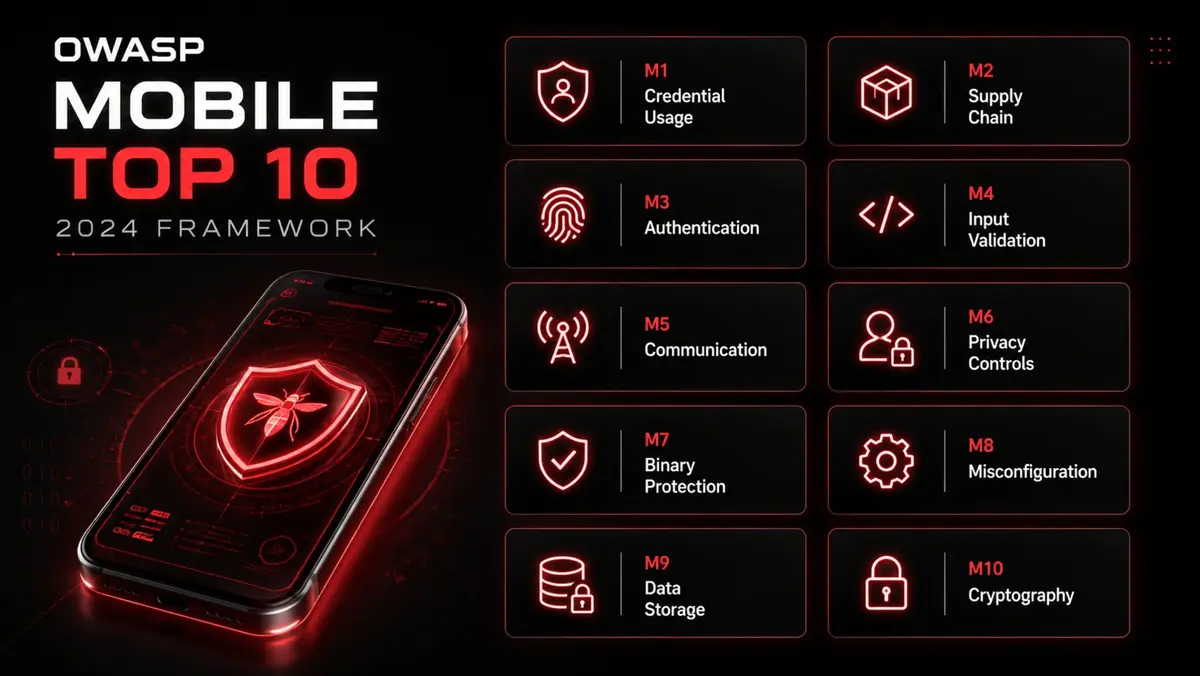
The ten OWASP Mobile Top 10 2024 risk categories

I) Introduction

Definition

A Mobile Application Penetration Test (MAPT) is a security assessment focused on identifying and exploiting vulnerabilities in a mobile application, its backend APIs, and its interactions with the mobile operating system (iOS or Android).

Primary Goal

The goal is to identify weaknesses that could lead to unauthorized access, data theft, privilege escalation, or other malicious activities. This is a hybrid assessment that combines elements of:

  • Application Testing: Analyzing the on-device application (the .apk or .ipa file).
  • Network/API Testing: Analyzing the communication between the app and its backend servers.
  • Platform Testing: Analyzing how the app interacts with the mobile OS.

Guiding Framework

This methodology is heavily guided by the OWASP Mobile Top 10 project, which outlines the most critical mobile application security risks.

II) Penetration Test Phases

Phase 1: Planning and Scoping

1.1. Define Objectives

  • Clearly define the goals (e.g., "Access another user's data," "Bypass in-app purchase," "Extract sensitive data from the device").

1.2. Define Scope

  • Platforms: Which platforms are in scope (iOS, Android, or both)?
  • Application: Specific app name and version (e.g., MyApp v1.3.2).
  • Distribution: How will the app be provided?
  • From the public App Store / Play Store (Black Box).
  • As a binary file (.apk / .ipa) provided by the client (Grey Box).
  • Backend: Are the backend APIs in scope? (Almost always, yes). List all known API endpoints.
  • Credentials: Will test accounts be provided for different roles (e..g, user, admin).

1.3. Define Test Type & Environment

  • Test Devices: Testing will be conducted on both non-rooted/non-jailbroken devices and rooted (Android) / jailbroken (iOS) devices. This is essential as it allows the tester to bypass OS-level protections and inspect the application's internal data.
  • Test Environment: A lab including emulators, physical devices, and a network interception proxy (e.g., Burp Suite).

1.4. Establish Rules of Engagement (ROE)

  • Authorization: Obtain explicit, written permission.
  • Testing Window: Define allowed testing times.
  • Data Handling: Define procedures for handling sensitive user data discovered during the test.
  • Communication Channels: Establish a point of contact for critical findings.

Phase 2: Static Analysis

This phase involves analyzing the application binary without running it.

2.1. Obtain the Application

  • Download from the store or receive the .apk (Android) or .ipa (iOS) file from the client.

2.2. Decompilation & Static Analysis

Android (.apk)
  • Use apktool to decompile the app into its resources and smali (assembly) code.
  • Use dex2jar to convert the app's classes.dex file into a .jar file.
  • Use a Java decompiler (e.g., jd-gui, JADX) to view the Java source code.

iOS (.ipa)
  • An .ipa is a ZIP file. Unzip it to access the application bundle.
  • If the app is from the App Store, it will be encrypted. Use tools like frida-ios-dump or Clutch on a jailbroken device to decrypt the binary.
  • Analyze the binary with a disassembler like Ghidra, Hopper, or IDA Pro.

2.3. Look for Static Vulnerabilities

  • Hardcoded Secrets: Search the decompiled code and resource files for hardcoded API keys, passwords, encryption keys, or sensitive URLs.
  • Manifest/Plist Analysis
  • Android (AndroidManifest.xml): Check for android:debuggable="true", exported components (Activities, Services, Broadcast Receivers) that could be insecurely called by other apps, and insecure permissions.
  • iOS (Info.plist): Check for custom URL schemes, permissions, and insecure configurations.
  • Insecure Code: Look for use of weak encryption (e.g., ECB mode), use of SharedPreferences for sensitive data (Android), or insecure logging (e.g., Log.d).

Phase 3: Dynamic Analysis

This phase involves running the app on a device and interacting with it.

3.1. Environment Setup

  • Configure a physical (rooted/jailbroken) device or emulator.
  • Install the application.
  • Configure the device to proxy all network traffic through a tool like Burp Suite or OWASP ZAP. This requires installing the proxy's CA certificate on the device.

3.2. Testing

The following is OWASP Mobile Top 10 2024.

CodeVulnerabilityExplanation
M1Improper Credential UsageThe risks associated with mishandling authentication credentials. This includes hardcoding API keys or tokens in the app binary, failing to use the secure storage mechanisms (like iOS Keychain or Android Keystore), or transmitting credentials in plaintext.
M2Inadequate Supply Chain SecurityA new and critical addition. This addresses the risks of using third-party libraries, SDKs, or components that may be vulnerable, malicious, or outdated. It highlights that your app is only as secure as its weakest dependency.
M3Insecure Authentication/AuthorizationThis merges the old M4 and M6. It covers vulnerabilities where the app fails to verify the user's identity correctly (authentication) or fails to enforce what an authenticated user is allowed to do (authorization), leading to unauthorized access or privilege escalation.
M4Insufficient Input/Output ValidationThis covers injection attacks (SQLi) and issues like Cross-Site Scripting (XSS) within WebViews. It emphasizes that mobile apps, just like web apps, must sanitize all data coming in from users or external APIs.
M5Insecure CommunicationRetained from the old list. This refers to data traversing the network without adequate protection, such as using HTTP, failing to validate SSL/TLS certificates, or failing to implement certificate pinning for high-security apps.
M6Inadequate Privacy ControlsAnother significant modern addition. This focuses on the excessive collection of Personally Identifiable Information (PII), accessing sensitive sensors (camera, GPS) without consent, or leaking user data to third parties (advertisers/analytics) inadvertently.
M7Insufficient Binary ProtectionThis merges the old M8 (Tampering) and M9 (Reverse Engineering). It addresses the lack of code obfuscation, root/jailbreak detection, and anti-tampering mechanisms, which makes it easier for attackers to analyze and modify the app.
M8Security MisconfigurationAdopted from the Web Top 10. This covers insecure default settings, leaving debug features enabled in production, or misconfigured cloud storage (e.g., AWS S3 buckets) accessed by the app.
M9Insecure Data StorageWhile dropped from #2 to #9, it remains critical. It refers to storing data insecurely on the device file system, such as in standard XML files, SQLite databases, or log files, without encryption.
M10Insufficient CryptographyThe use of weak, deprecated, or custom encryption algorithms (e.g., MD5, SHA1, RC4) instead of industry standards (AES, SHA-256), or implementing crypto protocols incorrectly.

Phase 4: Exploitation

Chain vulnerabilities to demonstrate maximum impact.

Example 1 (Data Theft):

  1. Bypass SSL pinning(Phase 3)
  2. Intercept traffic(Phase 3)
  3. Discover an IDOR vulnerability in the API(Phase 3)
  4. Write a script to dump all user records(Phase 4)

Example 2 (Account Takeover)

  1. Decompile the app(Phase 2)
  2. Find a hardcoded API key(Phase 2)
  3. Use key to access an admin API endpoint(Phase 3)
  4. Reset any user's password(Phase 4)

Example 3 (On-Device Theft)

  1. Use app(Phase 3)
  2. Find the auth token stored in plaintext in a SharedPreferences file(Phase 3)
  3. Steal the token and replay it in Burp Suite to hijack the user's session(Phase 4)

Phase 5: Reporting

  • Executive Summary: High-level, non-technical summary for management, focusing on business risk.
  • Technical Report: Detailed report for developers.
  • Vulnerability Details: For each finding:
  • Description: A clear explanation (e.g., "OWASP M2: Insecure Data Storage").
  • Affected Platform(s): (iOS, Android, or Both).
  • Evidence: Screenshots, code snippets, HTTP requests, and file paths.
  • Impact: The potential business impact.
  • Risk Rating: (Critical, High, Medium, Low).
  • Remediation: Provide clear, mobile-specific, and prioritized instructions.

Phase 6: Remediation

Remediation and Re-testing

  • Present the findings in a debrief meeting.
  • After the client's development team has implemented the fixes, perform a targeted re-test to validate that the vulnerabilities have been successfully remediated.
Back to all services

Ready to scope this engagement?

Tell us about your environment and objectives — we'll return a tailored scope, timeline, and quote within 24 hours.

Request a Free Scoping Call